
System Options - OHS Access
Once enabled OHS Access allows specific restrictions to be set on what OHS items people (or incumbents of positions) can see within OHS in Employee Self-Service Kiosk.
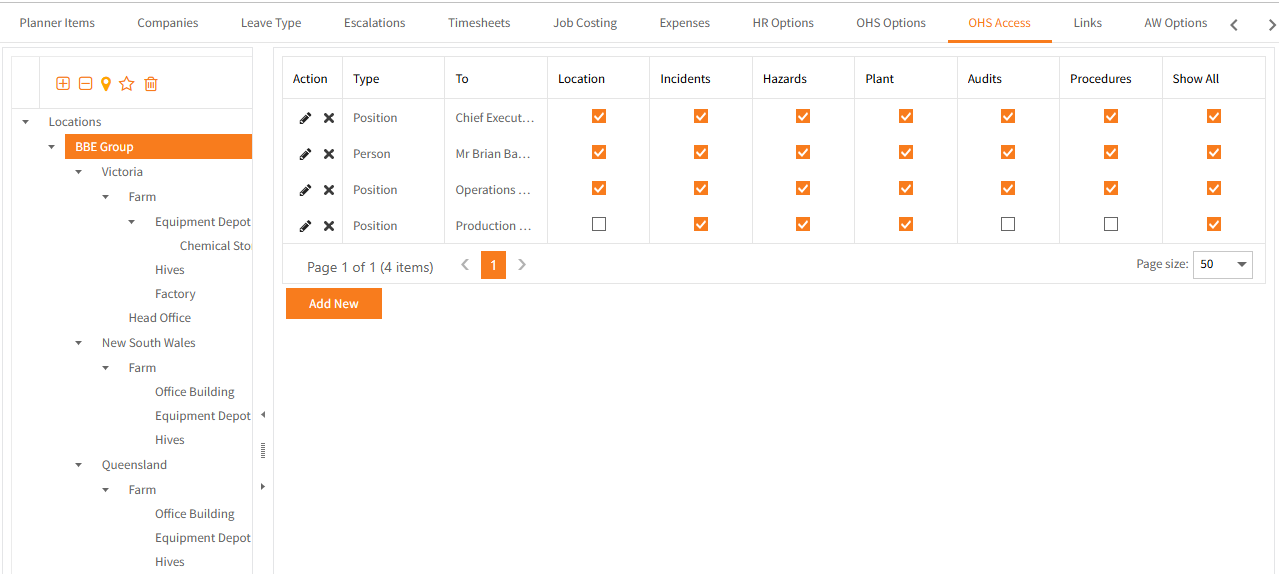
- Select (highlight) the required location for which the restriction applies.
- Click Add New each time a new restriction needs to be set up.
- Base this restriction set-up on either a person or a position.
Search for the required name or position. - Tick the relevant boxes to specify the OHS areas that this person/position is allowed to edit.
- By default the person/position will be able to view the OHS areas for the specific Company > Location you selected.
Tick Show All if you want this set-up to apply to all child locations within the specific location. -
To setup access to all areas for a person or position, set the restriction in the top-most Location (BBE Group is this example).
- Restrictions may be edited or deleted by clicking the relevant icon in the Action column.
Return to Admin Menu